
tl;dr
- we’re building an rl post-training platform, targetting developers who have never post-trained a model. we figured out the training, but the open problem was onboarding.
- we tested different approaches for both and missed: an sdk-first approach with notebook templates for experienced users, and a no-code config wizard for new users.
- the deeper miss: we were designing for how people worked two years ago, but today an engineer points a coding agent at a problem and asks it to do everything.
- so we rebuilt onboarding agent-first: one command and a plain-language prompt they can modify, and customers see some tangible results in 5-10 minutes that convinces them this might work for them.
who did we need to design for
castform was designed and built to be a platform for post-training, aimed at developers who may never have done it. this served a challenge for us, as we needed to design for two different dev audiences with very different profiles:
- the experienced researcher or ml engineer who knows exactly what they need to do, they just wants to validate our service works, configure what they need, and start training as soon as possible.
- the average ai engineer who has never post-trained anything. they’ve probably done prompt-engineering at most. they may have heard of post-training, but they have no reason yet to believe it’ll work for their problem, and no appetite to spend days finding out.
for both these customers, we’ve designed the benchmax sdk for setting up and launching training runs, while abstracting away the training and infra complexity. but the challenging piece was in the developer experience of getting both these user types onboarded within minutes before they lose interest.
what we tested first
our earliest iteration was python notebook templates. it was simply what we were most familiar with and popular in the research space. so we built notebooks for different use cases that walked developers through the pipeline step-by-step.
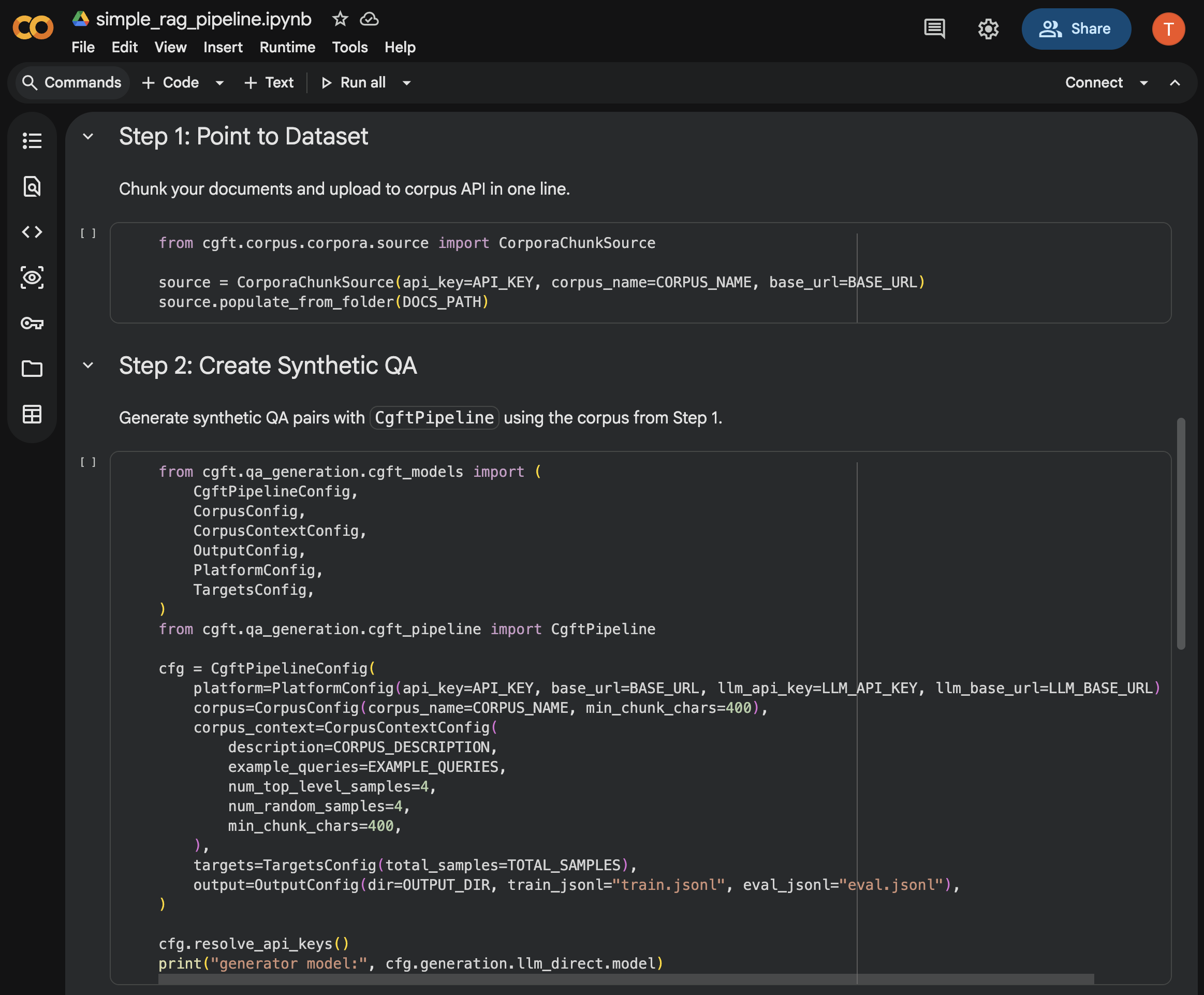
when testing this, it was clearly evident that newcomers couldn’t understand enough from glancing at a wall of text and code how this would fit their use case.
so we swung the other way and built a no-code config wizard to design and launch training runs. define your task, connect your data, generate training examples, then launch a training run in minutes. to help devs understand how their designs map to the sdk, we added a live python preview alongside the forms, updating as you changed fields, with one-click export to the exact same code.
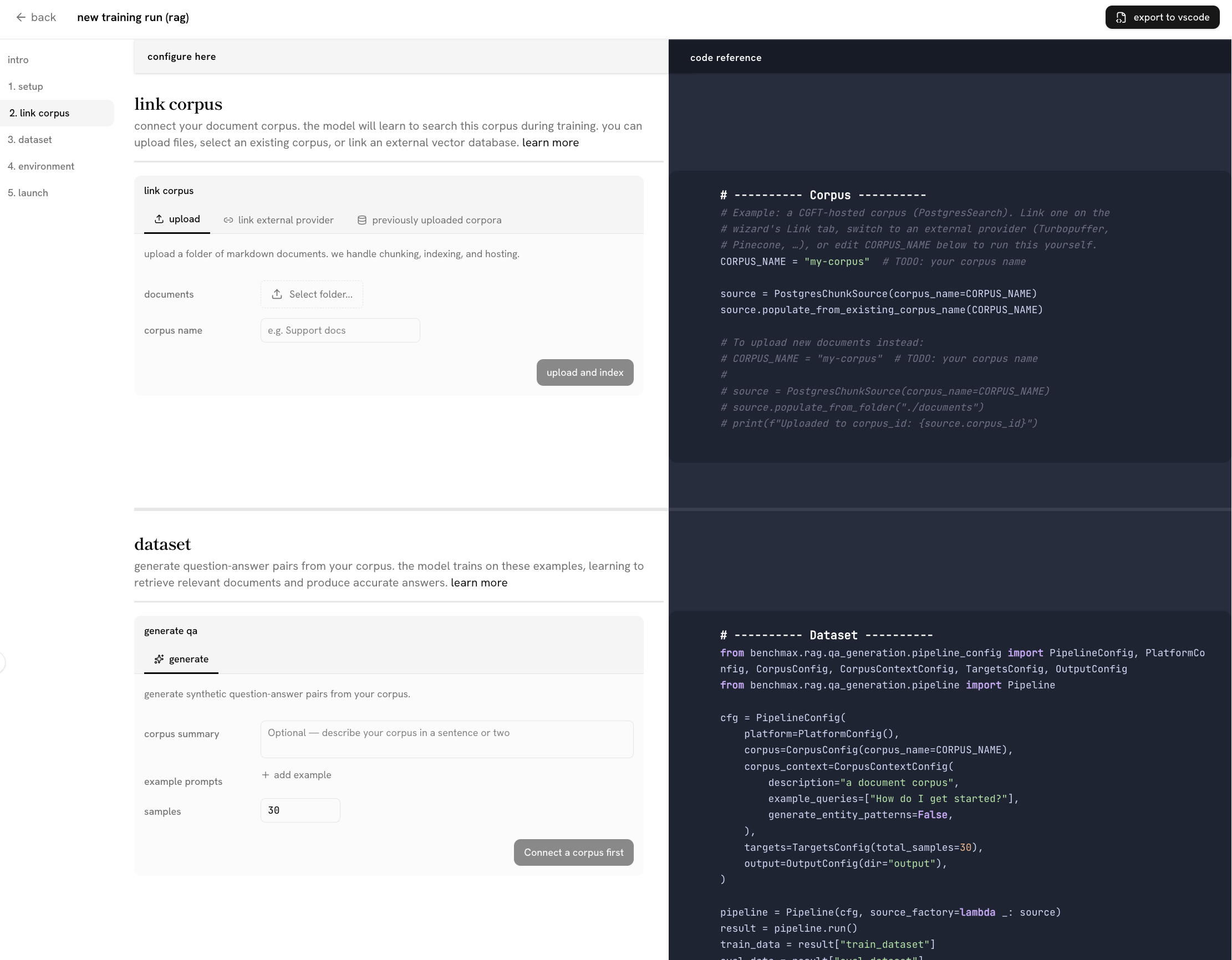
we felt this bridges the gap between the two developer types:
- experiened devs could scroll and glance to understand what the platform and sdk offers, then simply export to their IDE and get started right away
- newcomers could follow each step of the pipeline required to post-train for their task, and launch a simple training run in minutes. once they were satisfied and wanted to go further, they could export the code as well. the wizard would teach the mental model and then hand you to the sdk.
this is what we first launched our beta with.
what we quickly learned
two things stood out, and they reshaped the whole developer experience:
-
nobody reads the ui. devs open their coding agent and ask it to do everything. they don’t read code or docs, they don’t reach for a clean ui, they point claude at the platform and expect it to figure out the setup. every hour we spent polishing fields and dropdowns went into an interface fewer people wanted to touch. even two well-crafted sentences were ‘too much text’.
-
the ‘aha’ moment needs to be earlier. even with all our optimizations,a new customer designing a training run for their task, launching, and waiting for enough training steps to get convincing results would take more than 30 minutes. we’d assumed the moment that convinced someone to become a customer was a finished run on their task, but dropoff would happen well before that. time-to-value needed to be much shorter.
so all we really needed, was to immediately get devs to a believable baseline on the simplest version of their problem. and to get devs there, we needed to just strip all our text and fancy ui, and simply just leverage their coding agent. that minimizes friction and time to value; the value being a baseline that convinces them ‘this could work’, and that they can come back later to iterate, launch a run, add billing information, etc.
the agent-first onboarding
that is the journey we now design for: a developer arrives, maybe browses a few demo results first, then asks their coding agent to try it on their real task and gets a baseline back within five minutes. that baseline is what earns their conviction. the full run, with the hours and gpus it takes, is what they come back for later.
given that, we rebuilt onboarding around the coding agent. instead of a wizard, you run one command, then copy a short prompt and edit it in plain language to describe your task.
from there your own coding agent does the work. in about 5 to 10 minutes it has:
- designed a simple environment for your task
- generated a small set of training and eval examples
- written rewards that optimize for what you asked for, or a sensible default if you didn’t say
- run rollouts on our platform to establish a baseline eval
then it reports back: what it designed and why, what the eval results show, and what it would change before a full run. we don’t do the full run for them, but the user come away with a working setup they understand and enough of a result to think “this is real, it could solve my problem, it’s worth my time.”
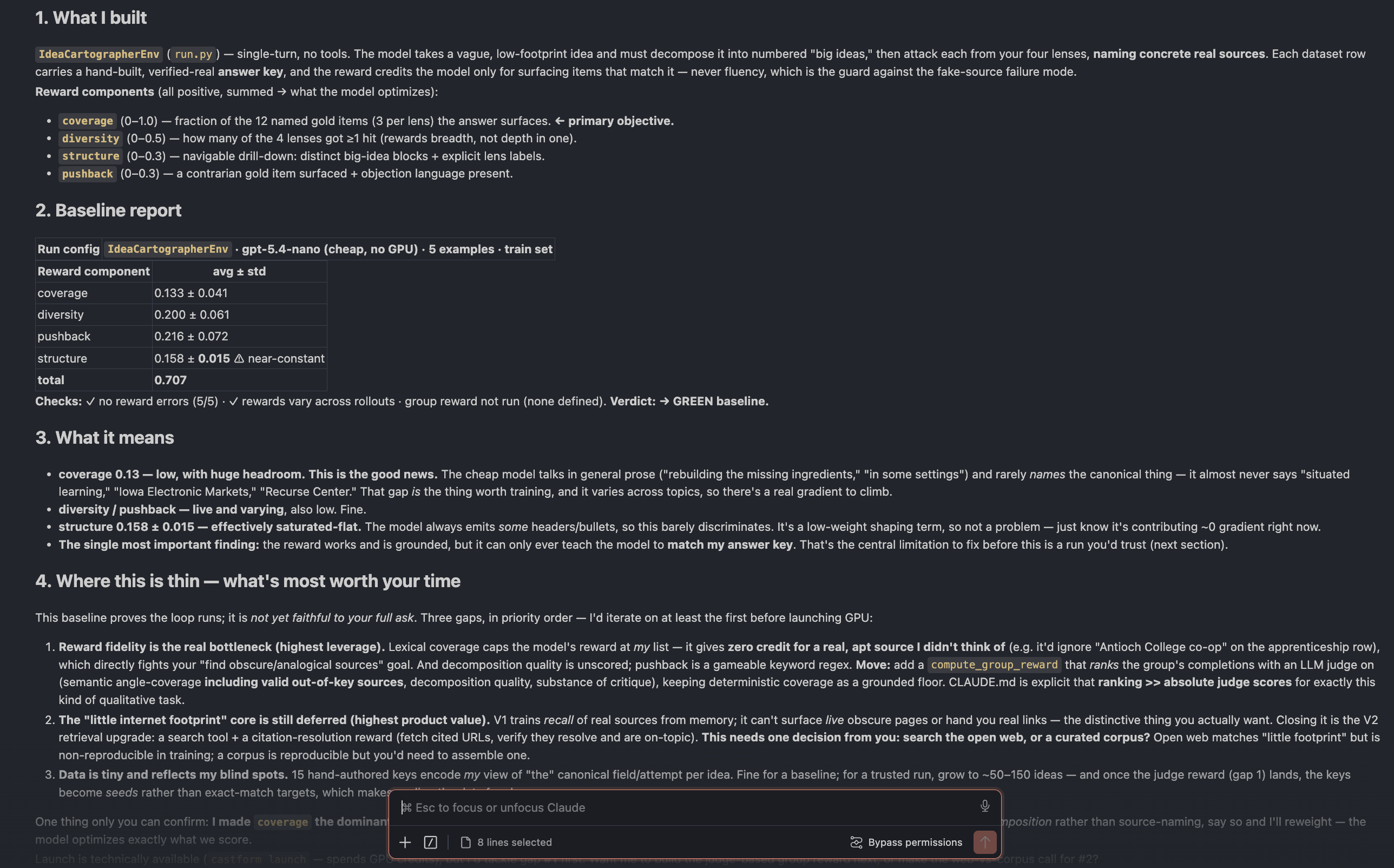
and because the agent simply works through our sdk, it serves both dev profiles at once, generating full code for the user to either edit and tweak manually, or vibecode their way to a fully launched run.
the deeper shift is that the user’s coding agent is the interface. our job moved from building screens to handing the agent the context it needs to do this well, then staying out of its way.
showing full results
baseline eval results alone aren’t enough to convince everyone, as some don’t yet know what post-training would give them. so in addition to the agent onboarding flow, we provide real training run results for various use cases, and allow devs to interact with them the same way they’d interact with their own training run.
each example covers the same ground:
- an overview of what the trained model does
- the full training and eval results, including reward curves and a rollout inspector
- a comparison against frontier models on task performance and cost
- an interactive playground to send the model your own prompts
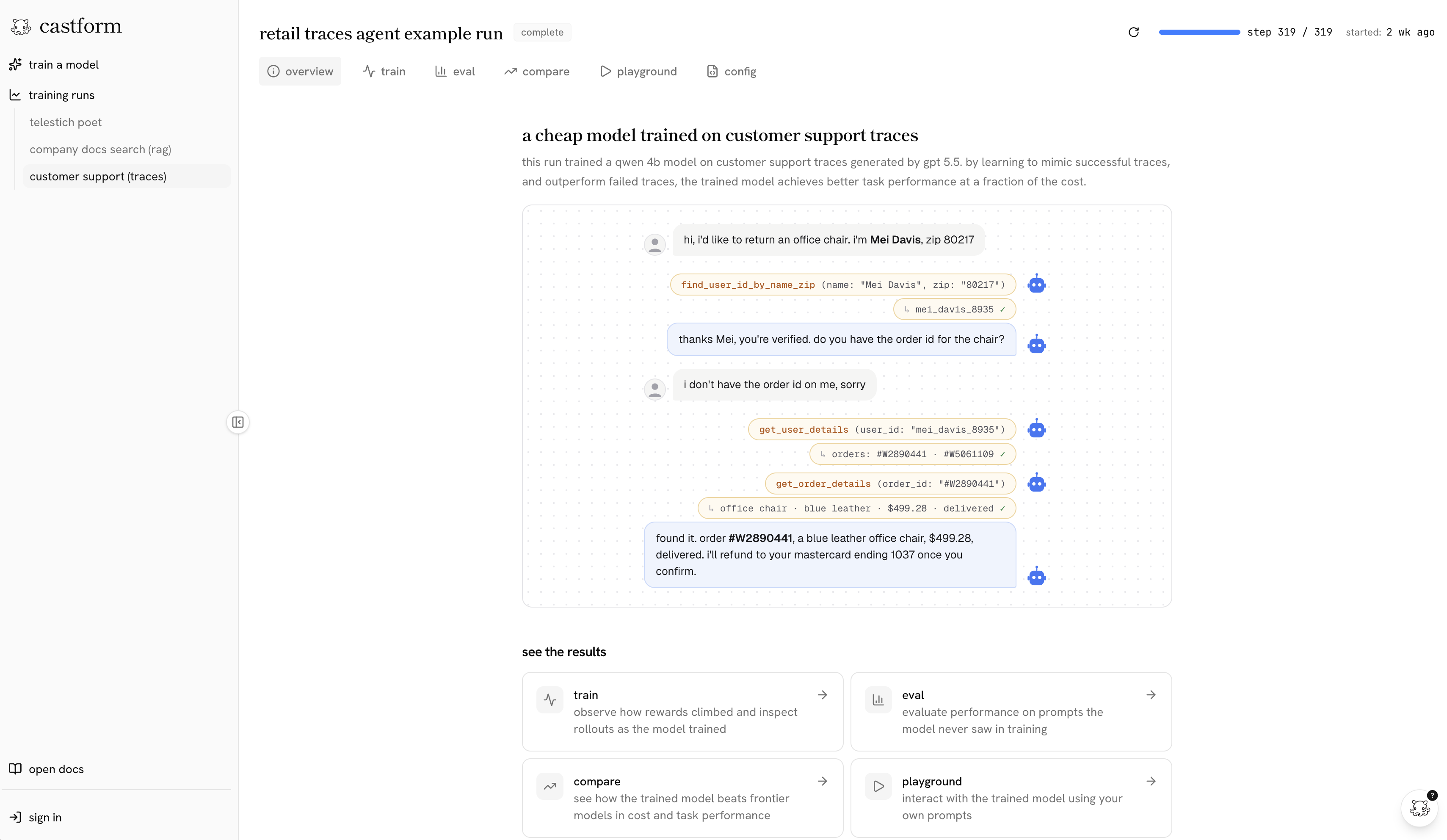
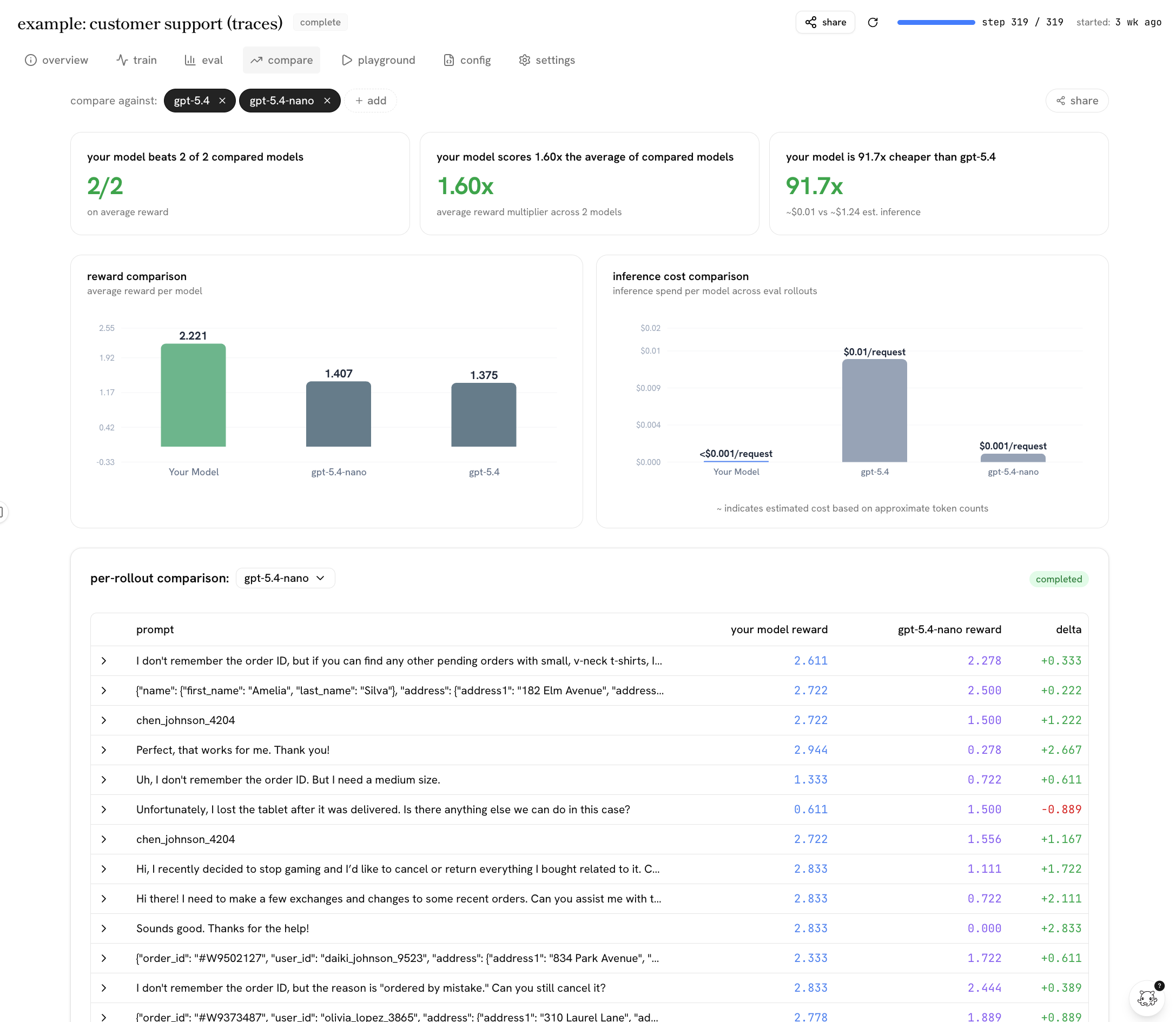
the examples do double duty:
- they show real results from use cases we’ve run so devs can understand the benefit in cost, performance, speed it’d bring to their related use case.
- they are the actual observability surface a dev gets gets so they’ll know the tooling they’ll have access to for their own run.
each example also has a sample prompt that they can also paste into their coding agent to get a baseline that mimics the setup.
the throughline
what changed most was how developers work. they hand a problem to their coding agent and expect it to figure things out, so any onboarding that makes them read screens and click through forms is friction. the version that works meets them where they already are: point your agent at the platform, and a few minutes later you have a real baseline on your own task.
that is why we stopped optimizing for time to first job and started optimizing for time to conviction. the full run, with its hours and gpus, comes later, once someone has already decided it’s worth it. if you’re building for developers today, that’s the bet we’d make: assume your next user is an agent, and design the shortest path for it to prove your product on their behalf.
the whole flow is public if you want to see the shape of it: app.castform.com.